
The Trade Routes Platform
A Windows desktop application that hosts every Trade Routes strategy in one place. It launches licensed strategy modules per instrument, connects to your MetaTrader 5 terminal, and gives you a live execution dashboard with full control over risk parameters.
Trade Routes software runs locally on the user's own computer and connects only to the user's self-directed brokerage account.
One application, every instrument.
The launcher sidebar groups instruments by asset class. Expanding a symbol lists its strategy modules with their license state — Active modules can be started, Deactive modules stay locked until a license file is issued. The workspace on the right shows the selected strategy with its own tab bar and a Start Trading action.
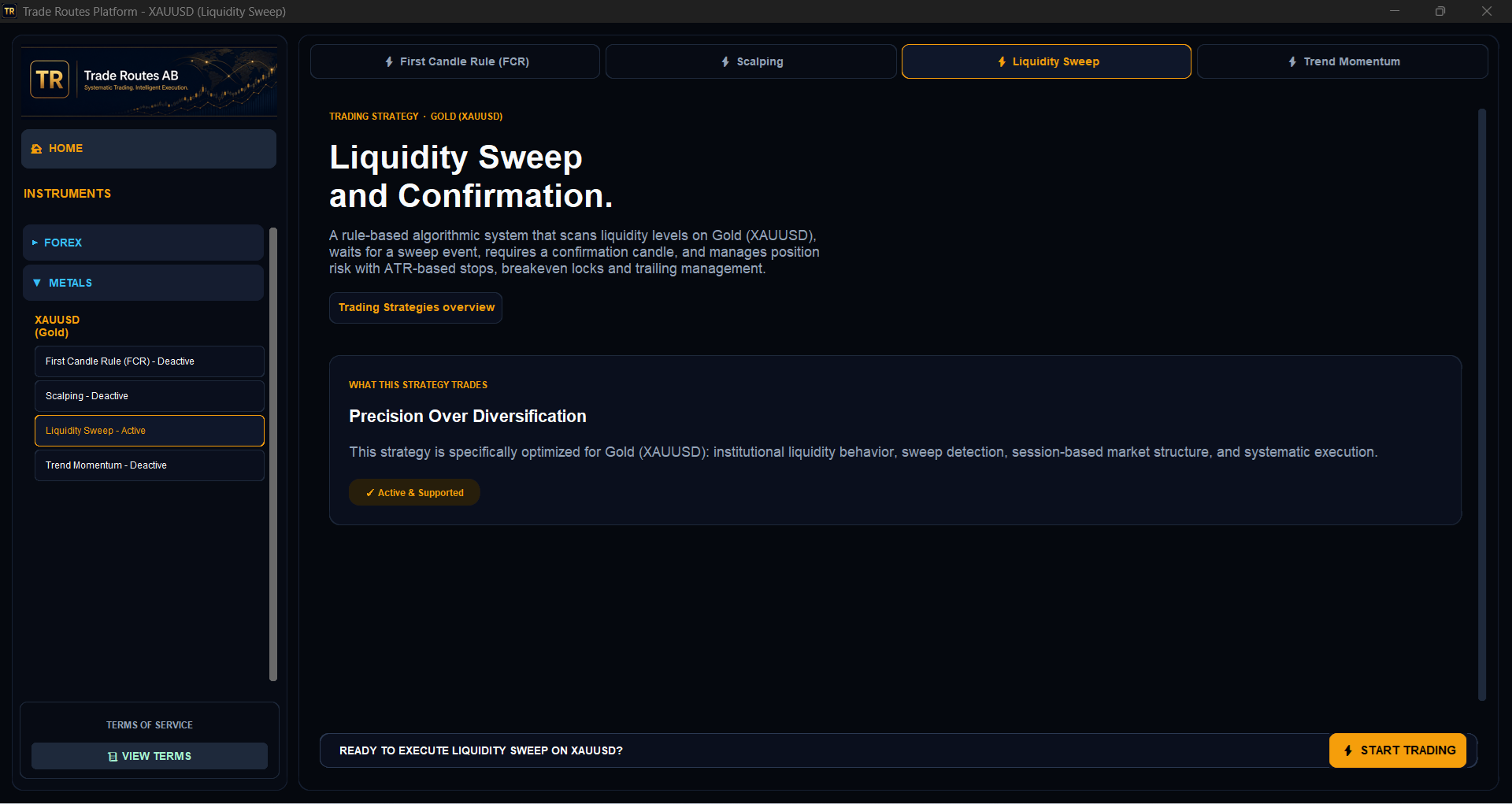
Instrument tree
Metals, Forex, Indices and Crypto categories with collapsible symbol groups and per-symbol strategy lists.
Per-strategy licensing
Each module checks for a matching license file bound to your trading account and server. Status is shown as Active or Deactive next to the strategy name.
One instance per license
The platform enforces a single running instance per license, so the same license cannot be executed twice in parallel.
Start Trading action
A fixed action bar launches the selected strategy module for the selected symbol in its own isolated process.
Live execution and control.
Starting a strategy opens its dashboard. It connects to MetaTrader 5, mirrors local and broker time, shows account, balance and equity, and streams every decision the algorithm makes to an event terminal.
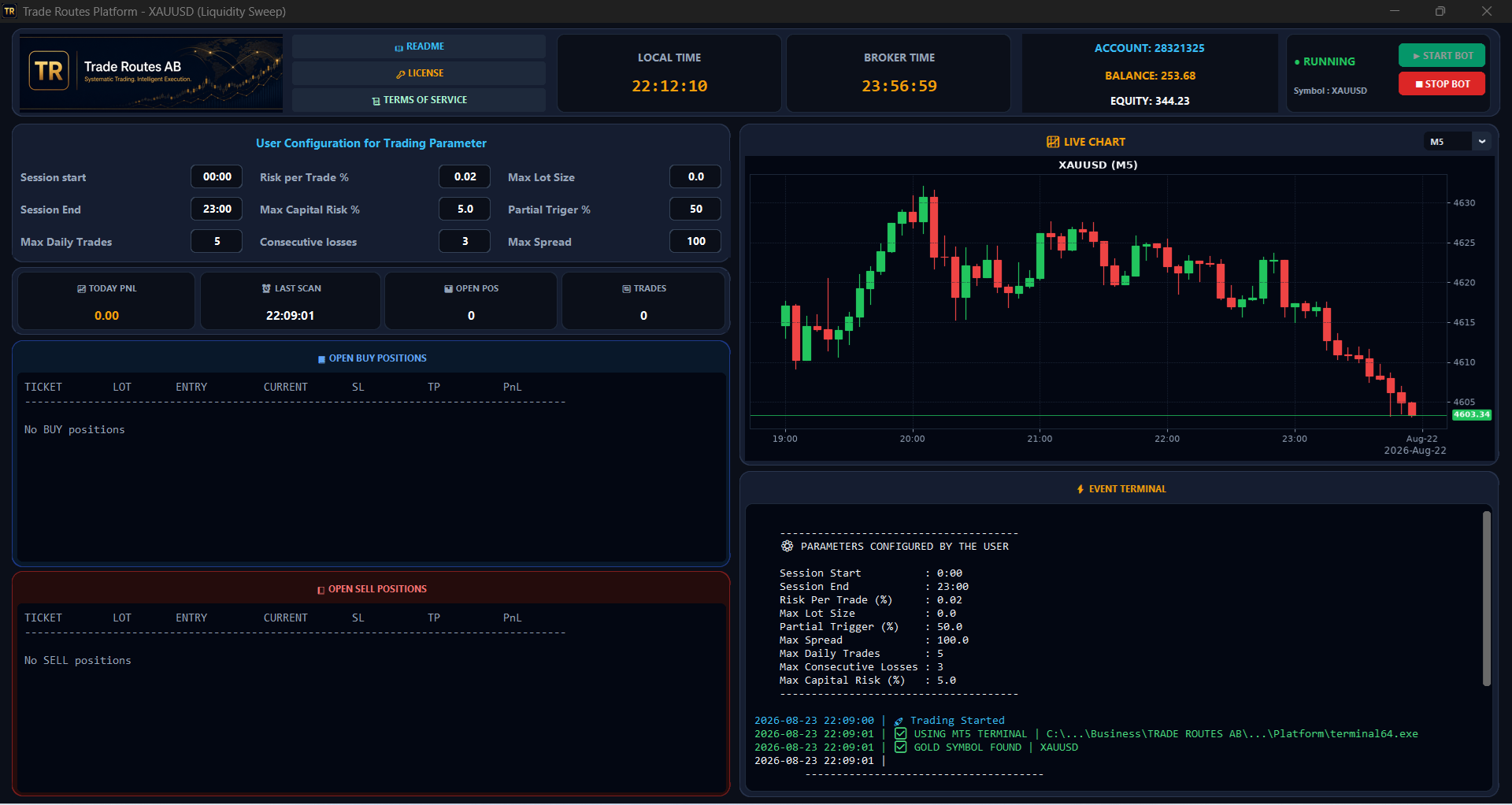
Session header
README, License and Terms of Service shortcuts, local time, broker time, account number, balance, equity, bot status and Start / Stop Bot controls.
Live metrics
Today PnL, last scan timestamp, open positions and total trades, with separate open BUY and open SELL position tables (ticket, lot, entry, current, SL, TP, PnL).
Live chart
Candlestick chart of the traded symbol pulled from MT5, with selectable timeframes: M1, M5, M15, M30, H1, D1, W1 and MN1.
Event terminal
Logs the configured parameter set at start-up, then every scan, signal, entry, modification and exit — plus explicit warnings if the MT5 terminal is closed or automated trading is disabled.
Every risk rule is yours to set.
Parameters are editable in the dashboard before the bot is started and are written to the event terminal so each session is auditable.
Instruments and strategy modules.
Gold (XAUUSD) is the live instrument today. The remaining modules are visible in the launcher but stay Deactive while they are in research and evaluation.
- XAUUSD · GoldActive
First Candle Rule (FCR) · Scalping · Liquidity Sweep™ · Trend Momentum
- XAGUSD · SilverDeactive
Silver strategy module
- EURUSD · Euro / US DollarDeactive
EURUSD strategy module
- GBPUSD · British Pound / USDDeactive
GBPUSD strategy module
- USDJPY · US Dollar / Japanese YenDeactive
USDJPY strategy module
- DJ30USD · Dow Jones 30Deactive
Index strategy module
- S&PUSD · US SPX 500Deactive
Index strategy module
- BTCUSD · Bitcoin / USDDeactive
BTCUSD strategy module
- ETHUSD · Ethereum / USDDeactive
ETHUSD strategy module
What you need to run it.
- Windows PC with MetaTrader 5 installed and automated trading enabled.
- A trading account with any MT5 broker — the software is broker-agnostic.
- A Trade Routes license file bound to your trading account and server.
- A minimum recommended account balance of 500 USD.
Software download after purchase
The Trade Routes Platform is not publicly downloadable. Once your license is purchased and issued, we email a private, time-limited download link for the package together with your .lic license file and installation instructions.
See licensing options →Start trading in nine steps.
Open and verify your live broker account.
Fund the account (500 USD recommended minimum).
Download and install MetaTrader 5 from your broker.
Contact Trade Routes support to license a product and provide your MT5 account number and server name.
You receive an invoice to be paid — send the payment confirmation to support.
Support provides your license file, receipt and download link.
Copy the .lic file you receive into the product folder.
Copy terminal64.exe from your MT5 installation into the product folder and log in.
Run the Trade Routes executable, choose your product and start the platform.
Need help choosing a broker or installing the platform? Contact us and we will guide you through the setup.
Get MetaTrader 5 on your device.
The Trade Routes Platform runs on Windows and executes through MetaTrader 5. Mobile builds of MT5 let you monitor the account, but the algorithm itself runs on the desktop terminal.
Screenshots show the software interface only and are not performance results. MetaTrader 5 is a third-party platform. Trade Routes AB is not affiliated with or endorsed by MetaQuotes Ltd. The software is a technical tool; the user assumes full responsibility for all trading decisions and risk.